2020年3月12日 星期四

windows 7/10 密技 : 你不可不知的雙碟系統安裝(搶先閱讀文)

windows 7/10 密技 : 你不可不知的雙碟系統安裝

第一章 雙碟系統的準備與分割
第二章 安裝順序
第三章 使用Autounattend.xml對安裝碟的意義與其主要達成的目標
第四章 Autounattend.xml內容解說
第五章 其他達成的方式
第六章 安裝後的處理
第七章 驗證與優化
第八章 補遺”關於Myusb 還原gpt disk”
註(一)   基本GPT disk(自己建的基本結構)
註(二) 在Windows下安裝傳統CLOVER 開機磁區(重要參考資料)
註(三)  如何自製各語系的windows 7 更新版
註(四) 其他軟體更新記要


windows 7/10 密技 : 你不可不知的雙碟系統安裝

第一章 雙碟系統的準備與分割

雙碟系統是指SSD+HDD組合而成的系統,利用SSD的讀取快速,配合HDD的可重覆寫入特性,依長處混搭而成,基本上是非常耐用,這是獨家祕技,只傳買書者吧!why?因為開機的是SSD,硬碟可能會壞軌,但只要排除就依然可繼續使用,這就是重點。
首先須準備 120G SSD + 500G HDD(segate較好,因為比較薄),勿使用M2 SSD,因為有些不相容(我是三星的m2,因為可用macos,但windows 7 oobeSystem有問題,windows 10無礙。),安裝時會產生不正常的狀況,除非你先裝好,用對拷方式才能解決問題。


將SSD放在sata_0,HDD放在sata_1
(a)MBR:
使用MBR安裝,需用正常安裝碟USB:來安裝
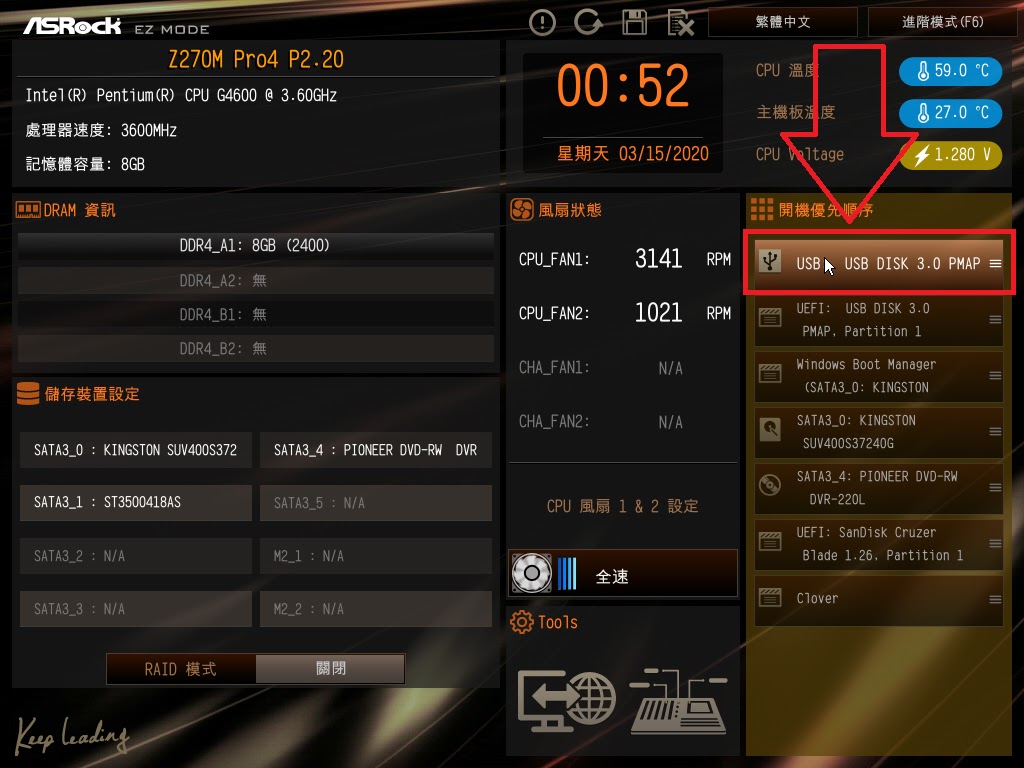


如何分割,如上圖,SSD全用MBR分割,設定active,HDD亦用MBR分割,首先只用約100G ,也設定為active,後面分割暫不使用,以後再說。如下圖是進w7安裝的狀況,為了可開機或沒殘餘檔案,請先格式化一遍(兩個分割都要)。


(b)GPT:
若你要使用GPT也可以(只有本人的W7版本可安裝GPT),不過結構完全不一樣,啟動方式亦不相同,(USB安裝碟 : MBR BIOS要選正常USB:項啟動,GPT BIOS要選 UEFI的項啟動)

準備 240G SSD + 500G HDD,240G SSD只是範例,其實120G也夠用了。
如何分割,如下圖,SSD 200M  efi 分割+NTFS分割,HDD先分割100G使用
詳細請閱 註(一) 內容說明


安裝,選企業版可能比較易於用KMS來啟動授權。


如何開機,選 Windows Boot Manager


這裡要特別說明,真GPT是包含EFI分割,這是BOOT資訊的儲藏地點,安裝中會寫入資料,所以你才會有Windows Boot Manager,當時的windows 7內完全沒EFI分割的處理,所以"windows 7並不支援GPT",同時你必須了解,開啟GPT模式,只能寫入GPT分割,MBR分割是禁止寫入。反之亦然。最後一章有教你如何手動,修正efi分割,加入clover的方式,供參考。
(隨你們怎麼想,但我都已經全然貫通了,絕非只是片段資料,也不想跟毛頭小鬼爭論。)
至於要如何對拷,Myusb內有完整的工具,MBR用ghost就可,GPT要用Macrium Reflect,或者全使用Macrium Reflect。我沒有說明Macrium Reflect是可以對拷macos的GPT 分割,上圖中有項clover啟動,是彩蛋,也許下本書會說明的。若你迫不及待,請參考 註(二)  的說明,你要用bootice 修正移失的setor。

本章結束,只做初略說明,沒提到windows 7/10均需要加上Autounattend.xml才能完整產生雙碟系統,windows 7的Autounattend.xml比較基本,windows 10的Autounattend.xml改變蠻多的,甚至要去修改電腦管理的使用者,


這是後面章節要敘述的,也不透露內容,將來只有請大家買書就知了。

第二章 安裝順序

安裝順序:
1.   VC++ runtimes  已自動安裝。
2.       顯卡驅動,不可太新


若不行,則需自裝


3.           主機板驅動( inf  驅動 ),音效,網卡驅動

4.       安裝aio-runtimes,JAVA 不裝¸VC++ runtimes 不裝,.net framework 4.72不裝。


5.     Chrome
6.       新CPU要裝wufuc


7.       UPDATE看看,本版只有少量需更新。


第三章 使用Autounattend.xml對安裝碟的意義與其主要達成的目標
Autounattend.xml對安裝碟而言,是自動安裝的回應檔,或稱之為oobeSystem,每個動作都有定義,也有一定的規則,詳細請閱讀Windows 評定及部署套件 (Windows ADK)內的Windows System Image Manager(windows SIM)。


以雙碟系統而言,不論是windows 7 or windows 10 Autounattend.xml的內容都是先處理一些登入訊息,設定產品金鑰,設定使用者,還有最重要的是將使用者目錄移至HDD,也就是讓安裝一竿到底完全不需輸入任何訊息的方式。

w10是不是需要雙碟系統嗎?YES!詳述於下
https://yucharles54.blogspot.com/2019/05/w10yes.html

---------------------------------------------------
範例:
要換方式,(A)使用SiMPLiX(B)使用SiMPLiX,USB與NVMe自行安裝。VC++ runtimes均自動安裝。
tw_windows_7_x64_5in1_2020.01_a.rar,  tw_windows_7_x64_5in1_2020.01_b.rar
en_windows_7_x64_5in1 2020.01_a.rar,  en_windows_7_x64_5in1 2020.01_b.rar
jp_windows_7_x64_4in1 2020.01_a.rar,    jp_windows_7_x64_4in1 2020.01_b.rar 
cn_windows_7_x64_4in1 2020.01_a.rar,    cn_windows_7_x64_4in1 2020.01_b.rar
windows 7 完測

真誠建議用舊版 tw_windows_7_x64_5in1_2019.03.rar慢慢升上去,問題會少很多。

須購買四片光碟,每片只服務單一語系,若要全部擁有,只得加購完整四服務序號。
基本閱讀資料:

含各語系範例

.


中英文說明書
歡迎洽談合作事宜規劃市場等,本人只提供技術也不想養一組行銷人員,其他就由投資方處理與分成。這當然要支付MS windows 7的使用費,因已停產所以看要支付多少?若你本身有原版序號,應該是免費的。

2020年2月7日 星期五

Windows 10 Permanent Activator ultimate

Windows 10 Permanent Activator ultimate 2020 v2.8
下載(詳閱內容):
windows-10-permanent-activator-ultimate-2020-v2-8-p2p.rar

PCMark 10


PCMark 10是Futuremark推出的最新版電腦效能測試工具,能夠透過以真實程式、操作為基礎的模擬測試,衡量電腦整體系統的效能表現,能做為一般人購買電腦的依據,瞭解並比較電腦的效能是否滿足需求。新版最大的改變,就是簡化操作、縮短測試時間,並可以直接比較2台電腦的測試結果。

單次測試即可看到所有成績
PCMark 10是為Windows 10推出的電腦測試工具軟體,主要的特色為加入新的測試細項,並改善舊有測試方式,讓PCMark 10的速度更快且更容易操作。雖然2013年6月推出的PCMark 8仍然能繼續在Windows 10電腦上使用,但是彼此的分數無法直接進行比較,所以仍然有升級至PCMark 10的必要性。

PCMark 10的界面、安裝與執行手續都與PCMark 8相當類似,只需點選幾個按鍵,不需複雜的設定就能自動執行測試,使用上相當簡單。

PCMark 10將所有項目整合為統一的測試,會在測試完成後會在結果中顯示Essentials、Digital Content Creation、Productivity、Gaming等4個項目的成績,相較之下PCMark 8將測試拆分為Home、Creative、Work、Applications、Storage等5個項目,使用者需要分別操作5次測試,才能取得各項目成績,這個改進可以大幅簡化操作,並省下許多測試時間。

然而使用者仍可以在執行時,選擇PCMark 10、PCMark 10 Express、PCMark 10 Extended等不同的測試模式,它們彼此的差異在於測試細項的多寡。PCMark 10為基本的測試套餐,PCMark 10 Express則省略一些細項以節省更多時間,PCMark 10 Extended為最完整的測試,可以取得所有細項的測試成績。

下載(內含註冊機):

futuremark-pcmark-10-2-1-2165-x64-multilingual-p2p.zip


2019年11月24日 星期日

NewBlue Titler Pro 7.0 Build 191114

NewBlue Titler Pro 7.0 Build 191114 Ultimate (x64) + Crack [SadeemPC]

The faster, smarter way to add stunning titles to your video projects. Bring your audience into the story with compelling titles and graphics - without sacrificing production time. Titler Pro 7 is the industry standard in titling software for video editors. Deliver exceptional production value with stunning 3D animated titles and motion graphics—all right within your favorite editing software.

Create Professional Titles With Minimal Effort
Need inspiration? Browse our extensive collection of over 700 professionally crafted designs to find the right fit for your project. Easily customize shape, color, animation and more to match your desired look and have great-looking graphics within minutes.

Take Your Graphics To The Next Level
Your vision becomes a reality with our fast and powerful Title Designer. Easily create your own custom graphics with an intuitive interface and library of pre-built animations, effects and other creative tools.

Import Existing Designs
Import existing images and videos, PSD, AE*, and vector files. PSD and AE import features let you modify the elements of the original file directly inside Titler Pro. *Ultimate version only

Save Critical Production Time
Work smarter, not harder with Titler Pro's intelligent workflow controls. Respond quickly to last-minute requests with unique features - like Multi-Title Management and Elastic Timeline - that let you implement project-wide graphics changes in a fraction of the time.

Work Faster with the New Engine
Titler Pro 7's entirely re-tooled NTX engine delivers faster-than-ever performance and next-level flexibility. Faster, lighter compression now allows titles to be stored using less memory while simultaneously improving image quality and achieving real-time playback.

Improved Timeline Flexibility
We've reworked our Elastic Timeline to make it easier than ever for title animations to dynamically follow your trim points, allowing you to have multiple title durations from a single design.

Simplified Multi Title Management
Set a design to be used by each title and enjoy time-saving workflows for editing multiple titles at once.

Simple, Smooth Rolling Credits
Experience this game-changing new technology and overcome the common industry problem of flickering text edges. Take the complexity out of the high-quality credit rolls with just a few simple controls, all within your editor

Object Following
Not sure if your lower third will need to fit 10 characters or 50? No problem. Pick the title layer of your choice and set the rest of the design to follow suit. The other title layers will dynamically adjust scale and position based on changes made to the "lead" layer, eliminating the need for manual modification.

What's New? 
https://newbluefx.com/products/titling/titler-pro/

https://youtu.be/xT56ackyoQ4


Microsoft ISO Downloader Premium 2019 v1.4

Microsoft ISO Downloader
Premium 2019 v1.4


Windows-ISO-Downloader

2019年11月23日 星期六

Internet Download Manager 6.35 Build 12 + Patch [SadeemPC]

Internet Download Manager,簡稱 IDM,是國外的一款優秀下載工具。目前憑藉著下載計算的速度優勢在外媒網站中均受好評,現在已被多數國人熟知。Internet Download Manager 提升你的下載速度最多達5倍,安排下載時程,帶有續傳功能,可以恢復因為斷線、網絡問題、計算機當機甚至無預警的停電導致下傳到一半的資料。

IDM具有動態文件分割、多重下載點技術,而且它會重複使用現有的聯機,而不需再重新聯機登入一遍。智能in-speed技術會動態地將所有設定應用到某種聯機類型,以充分利用下載速度。IDM支持下載隊列、防火牆、代理服務器和映懾服務器、重新導向、cookies、需要驗證的目錄,以及各種不同的服務器平台,它緊密地與Internet Explorer和Netscape Communicator結合,自動地處理你的下載需求。此外,IDM還具有下載邏輯最佳化功能、檢查病毒,以及多種偏好設定。